Forms and Bindings
If YouTube does not work, click here to watch from our GitHub repository.
In the previous tutorial, we explored Interaction Affordances — properties, actions, and events — and how they describe what a Thing can do. In this tutorial, we will focus on the next important question: How do those interactions actually happen over the network?
{
    "properties": {
        ...
        "forms": [ ... ]
    },
    "actions": {
        ...
        "forms": [ ... ]
    },
    "events": {
        ...
        "forms": [ ... ]
    }
}
In the Web of Things, this is handled through bindings. Bindings define how a Consumer communicates with a Thing using concrete protocols like HTTP, CoAP, MQTT, etc. or how the data is serialized, such as JSON, text or CBOR.
What are Bindings?
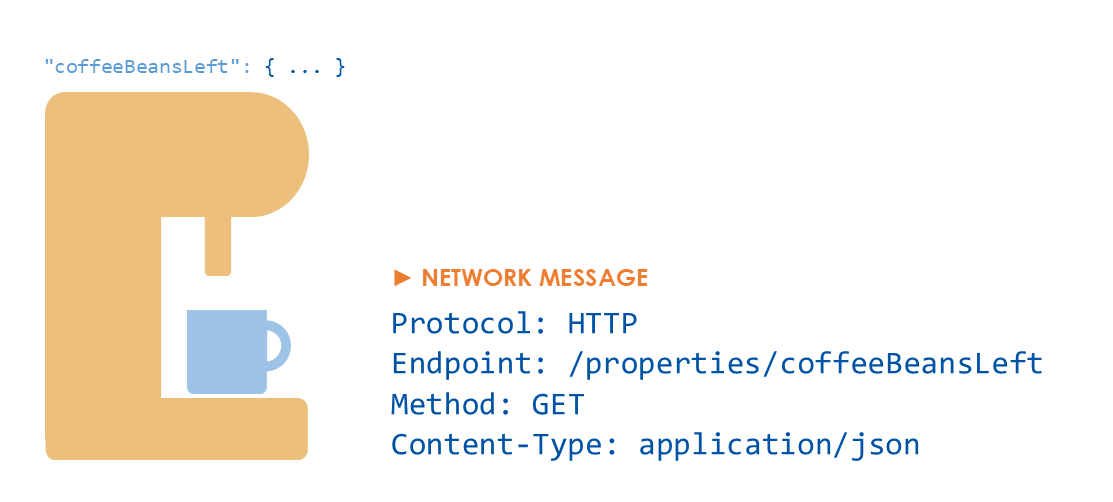
A binding maps an operation of an interaction affordance — such as reading a property or invoking an action — to a specific network message: communication protocol and endpoint, and the parameters required by the protocol. By the end of this tutorial, you'll understand how the Consumer knows where to send a request, which protocol to use, and how to encode the data.
Forms Structure
A form describes a way to interact with an affordance over a specific protocol. It can be thought of as a simple instruction to the Consumer: "To perform this type of operation on this affordance, send a request in this way to this address." Now let's break down the key parts of a form.
"forms": [
    {
        "href": ...,
        "op": ...,
        "contentType": ...
    }
]
href— Where and which protocol?op— What operation?contentType— How is data serialized?
WoT Operations
Each form can declare one or more operations, using the op field. Operations describe what semantic action(s) the Consumer can perform — for example: reading or writing a property, invoking an action, or subscribing to an event. These operation types are defined by the WoT specification and are independent of any specific protocol.
"op": "readproperty"
"op": "writeproperty"
"op": "invokeaction"
"op": "subscribeevent"
You can find a full list of operation types in the TD specification.
If op is omitted, default operations are inferred based on the affordance type. For example, forms of a readable property are assumed to include the readproperty operation unless stated otherwise.
"forms": [
    {
        "href": "..."
    }
]
For a readable property, the form above is interpreted as:
"forms": [
    {
        "href": "...",
        "op": "readproperty"
    }
]
Protocol and URI
The most important field in a form is href. The href is a URI that tells the client where to interact with the Thing and which protocol to use. The protocol is inferred directly from the URI scheme.
https://   -> HTTP
coap://    -> CoAP
mqtt://    -> MQTT
This design allows the Thing Description concept to stay protocol-agnostic while still enabling concrete protocol-level interactions. A single affordance can expose multiple forms as well, offering the same interaction over different protocols.
"forms": [
    {
        "href": "https://...",
        "op": "readproperty"
    },
    {
        "href": "coap://...",
        "op": "readproperty"
    }
]
Content Type
Forms also specify a contentType, which tells the client how the payload is encoded. Common examples include:
application/json   -> JSON
application/cbor   -> CBOR
text/plain         -> TEXT
{
    "href": "https://...",
    "op": "readproperty",
    "contentType": "application/json"
}
This ensures that both the Thing and the Consumer agree on how data is serialized and parsed.
If no content type is specified, protocol-specific defaults may apply, but explicitly declaring them improves interoperability.
Protocol-Specific Vocabulary
While WoT aims to stay protocol-independent, forms allow protocol-specific extensions when needed. These are expressed through additional fields defined in protocol binding specifications.
"forms": [
    {
        "href": ...,
        "op": ...,
        "contentType": ...,
        "htv:methodName": ...,
        "modv:function": ...
    }
]