Forms and Bindings in Practice
If YouTube does not work, click here to watch from our GitHub repository.
In the previous tutorial, we explored the basics of WoT forms and bindings.
Protocol Bindings in Practice
Now that we understand their structure, let's see how protocol bindings work in practice. When you want to write a Consumer application, you don't need any prior knowledge about the protocol being used. Instead, the Consumer reads the Thing Description, looks at the available forms, and selects one it understands.
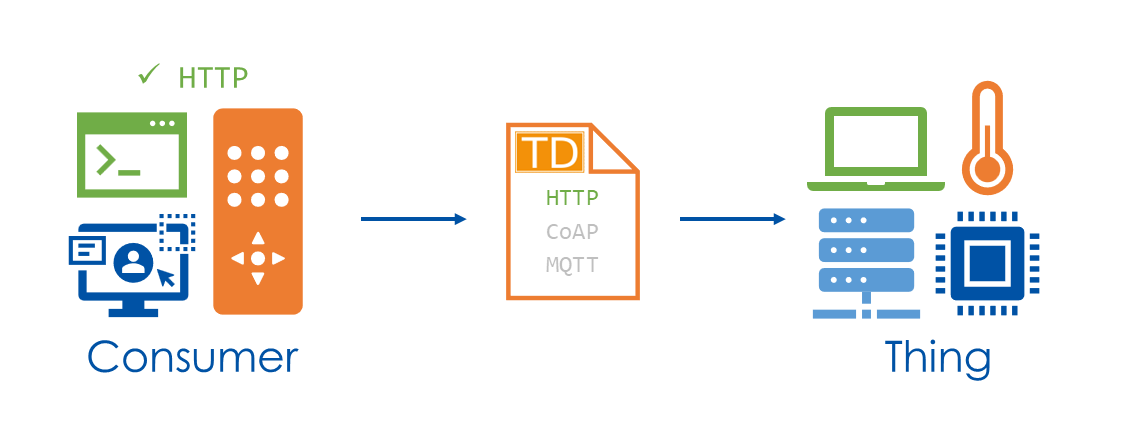
Let's walk through four protocols using our smart coffee machine example. For each one, we'll trace exactly how a WoT operation relates to real network traffic.
{
    "properties": {
        "coffeeBeansLeft": {
            "title": "Remaining Coffee Beans",
            "description": "Amount of remaining coffee beans in grams",
            "type": "number",
            "minimum": 0,
            "maximum": 500,
            "readOnly": true,
            "observable": false,
            "forms": [ ... ]
        }
    },
    "actions": {
        "brewCoffee": {
            "title": "Brew Coffee",
            "description": "Starts brewing a cup of coffee",
            "input": {
                "type": "object",
                "properties": {
                    "size": {
                        "type": "string",
                        "enum": ["small", "medium", "large"]
                    }
                }
            },
            "forms": [ ... ]
        }
    },
    "events": {
        "lowOnWater": {
            "title": "Low Water Level",
            "forms": [ ... ]
        }
    }
}
HTTP
First, we want the Consumer to perform the readproperty operation on coffeeBeansLeft so we can get the remaining amount of coffee beans.
"properties": {
    "coffeeBeansLeft": {
        "title": "Remaining Coffee Beans",
        "description": "Amount of remaining coffee beans in grams",
        "type": "number",
        "readOnly": true,
        "forms": [
            {
                "href": "https://coffee.example.com/properties/coffeeBeansLeft",
                "op": "readproperty",
                "contentType": "application/json",
                "htv:methodName": "GET"
            }
        ]
    }
}
To achieve this, the Consumer reads the form and translates it into a network request. The href tells it the address and that HTTP is the protocol. Then the htv:methodName field says to use a GET request and the contentType tells it to expect a JSON in return. So the Consumer sends the following request:
GET /properties/coffeeBeansLeft HTTP/1.1
Host: coffee.example.com
Accept: application/json
The Thing receives this, reads its internal sensor, and responds:
HTTP/1.1 200 OK
Content-Type: application/json

Payload: 320
The Consumer parses the JSON body — a single number, exactly as the coffeeBeansLeft data schema ("type": "number") declared — and now has the value of 320 grams. The form told it how to fetch; the data schema told it what shape to expect.
CoAP
Now the Consumer wants to invoke the brewCoffee action.
"actions": {
    "brewCoffee": {
        "title": "Brew Coffee",
        "description": "Starts brewing a cup of coffee",
        "input": {
            "type": "object",
            "properties": {
                "size": {
                    "type": "string",
                    "enum": ["small", "medium", "large"]
                }
            }
        },
        "forms": [
            {
                "href": "coap://coffee.example.com/actions/brewCoffee",
                "op": "invokeaction",
                "contentType": "application/cbor",
                "cov:method": "POST"
            }
        ]
    }
}
The Consumer reads this form just like before — but now href starts with coap://, so it knows to use CoAP instead of HTTP. The cov:method field says POST. The contentType is application/cbor, so this time the Consumer encodes the action input for a medium sized coffee in CBOR.
The resulting CoAP message looks something like this:
CoAP POST coap://coffee.example.com/actions/brewCoffee
Token: 0x4a2b
Content-Format: 60  (= application/cbor)

Payload (CBOR): a1 64 73 69 7a 65 66 6d 65 64 69 75 6d
       decoded: { "size": "medium" }
The Thing receives the message and sends back a CoAP response with code 2.04 Changed, confirming the action was accepted.
CoAP ACK 2.04 Changed
Token: 0x4a2b

(no payload body)
From the Consumer's perspective, this was identical to invoking the HTTP action — it performed an invokeaction operation and got a success response. The fact that it used CoAP instead of HTTP, or CBOR instead of JSON, was determined entirely by what was written in the form.
MQTT
For the lowOnWater event, the form looks like this:
"events": {
    "lowOnWater": {
        "title": "Low Water Level",
        "data": {
            "type": "number",
            "description": "Remaining water level in milliliters"
        },
        "forms": [
            {
                "href": "mqtt://broker.example.com:1883",
                "op": "subscribeevent",
                "mqv:filter": "coffee/events/lowOnWater",
                "mqv:qos": "1",
                "contentType": "text/plain"
            }
        ]
    }
}
The op field is subscribeevent, which tells the Consumer it needs to listen rather than request. The href points to the MQTT broker, and the mqv:filter term gives the topic filter — coffee/events/lowOnWater — that the Consumer should subscribe to. The mqv:qos term tells the Consumer that the Thing publishes these events at QoS level 1, MQTT's at-least-once delivery. So the Consumer connects to the broker and sends:
SUBSCRIBE
Topic: coffee/events/lowOnWater
QoS: 1
The broker confirms with a SUBACK.
SUBACK
Granted QoS: 1
Now the Consumer is registered and waiting. On the Thing side, when the water level drops below the threshold, it publishes to the same topic:
PUBLISH
Topic: coffee/events/lowOnWater
QoS: 1

Payload: 50
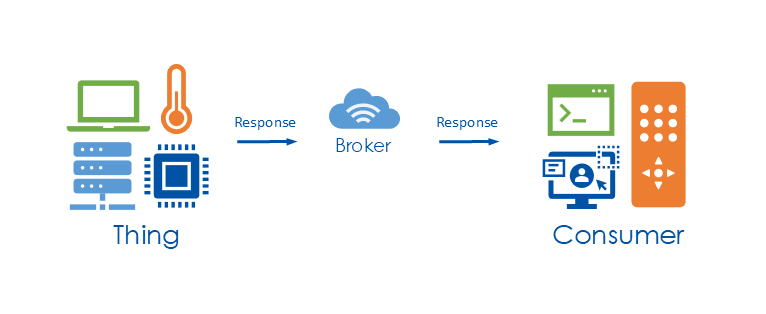
The broker forwards this to the Consumer. The Consumer receives the message, parses the text as declared by contentType, and now has the event data: 50 milliliters remaining.
What's important here is that the WoT operation subscribeevent naturally maps to MQTT's publish/subscribe model. The Consumer didn't need to know it was MQTT — it simply performed a subscribeevent operation, and the form told it exactly how to do that: connect to this broker, subscribe to this topic filter, and expect plain-text events published at QoS 1.
Modbus
We've now seen three protocols applied to different affordances of our coffee machine. Let's see how we'd adapt it to a completely different kind of protocol: Modbus.
Modbus is a traditional industrial protocol widely used in automation and control systems. While it predates modern web technologies, WoT protocol bindings make it possible to expose Modbus-based devices through a standardized Thing Description. This allows legacy industrial equipment to be integrated into modern web-based systems, without changing the underlying protocol.
{
    ...
    "base": "modbus+tcp://192.0.2.1:502/1/",
    "properties": {
        "waterLevel": {
            "title": "Water Level",
            "type": "integer",
            "description": "Current water level in milliliters",
            "forms": [
                {
                    "op": "readproperty",
                    "href": "40003",
                    "modv:function": "readHoldingRegisters",
                    "contentType": "application/octet-stream"
                }
            ]
        }
    }
    ...
}
Let's trace how the Consumer translates this form into a Modbus message. The base URI gives it the device address and port 502. The number /1/ at the end is the Unit ID — the Modbus device identifier on the bus. The href value 40003 is the register address. The modv:function field says readHoldingRegisters, identifying the type of register being addressed — Holding Registers can be both read and written, and are typically used to store sensor values like a water level. Combined with the readproperty operation declared in op, the Consumer knows to read that register, which Modbus carries out as the Read Holding Registers function. The contentType is set to application/octet-stream, which means the expected response is a sequence of bytes. Putting this all together, the Consumer sends:
Unit ID:        0x01     (from /1/ in base URI)
Function Code:  0x03     (readHoldingRegisters from modv:function)
Start Address:  40003
Quantity:       0x0001   (read 1 register = 2 bytes)
The Thing responds with the raw register value:
Function Code:  0x03
Byte Count:     0x02       (2 bytes for one 16-bit register)
Data:           0x01 0x2C  (= 300 decimal)
The Consumer receives those two bytes and interprets them as a 16-bit big-endian integer: 0x012C = 300. Because the Thing Description specifies that waterLevel is an integer, the WoT runtime automatically turns this into the number 300 — the water level in milliliters.
This is WoT's value fully on display. A developer writing a Consumer application only needs to work with readproperty operations and Thing Descriptions — the protocol binding underneath handles the Modbus function codes, register addresses, and byte encoding on their behalf. All of that knowledge lives in the form, expressed through modv:function, href, and the base URI. The form is the bridge between the abstracted WoT operations and the protocol.
Summary
To summarize:
- Bindings define how interactions are executed over the network
- They are expressed using
formsin the Thing Description - Different protocols fit different interaction patterns
- WoT unifies them under a single, consistent interaction model